An outlined Material 3 choice in a SegmentedButtonGroup. More...
Detailed Description
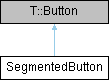
An outlined Material 3 choice in a SegmentedButtonGroup.
Use SegmentedButton children in a SegmentedButtonGroup for single or multiple selection. The inherited text, icon.name, icon.source, checked, enabled, and activation signals remain available. The group synchronizes checked with its authoritative selectedIndexes, assigns equal widths, and joins the visible endpoints. A standalone segment is a checkable button.
The default visual container is 40 dp high within a 48 dp interaction area. Selection reserves indicator space, so checking a segment does not resize its group. Labels elide when the assigned width cannot fit the content.
Presentation depends only on text, icon.name, and icon.source. Text alone displays a centered label; an icon alone displays a centered icon. Together, the icon appears beside the label, mirrored in RTL. The inherited display property remains available through T.Button but has no effect on presentation or sizing, regardless of its value.
For icon-only choices, omit text and set Accessible.name; decorative icons and labels are excluded from the accessibility tree. Grouped segments expose radio-button roles in single mode and checkbox roles in multiple mode. Accessibility activation uses the same button click path as mouse and keyboard activation.
Definition at line 49 of file SegmentedButton.qml.
The documentation for this class was generated from the following file:
- src/controls/qml/components/SegmentedButton.qml